
Choosing a web hosting provider is one of the first important decisions when starting a website. Whether you are building a personal blog, launching a business website, starting an online store, or managing websites for clients, your hosting provider plays an important role in your website’s performance, security, and reliability.
Hostinger is one of the hosting providers that frequently appears in discussions about affordable web hosting. It offers shared web hosting, WordPress hosting, cloud hosting, website-building tools, and other services for individuals and businesses.
But is Hostinger actually worth buying, or does its affordable introductory pricing make it look better than it is?
I have been using Hostinger for more than two years and have experience with multiple hosting plans through my website, DevGraphiq. This Hostinger review looks at Hostinger from a practical website owner’s perspective, covering its features, usability, pricing considerations, advantages, limitations, and suitability for different types of websites.
Instead of simply listing features from the company’s website, I will focus on the things website owners should understand before purchasing a hosting plan.
Quick verdict: Hostinger is worth considering if you want an accessible hosting platform with an integrated management dashboard, WordPress support, and several website management tools. However, your choice should depend on your website’s resource requirements, expected traffic, technical needs, and long-term hosting budget.
What Is Hostinger?
Hostinger is a web hosting company that provides services for individuals, freelancers, developers, and businesses looking to establish an online presence.
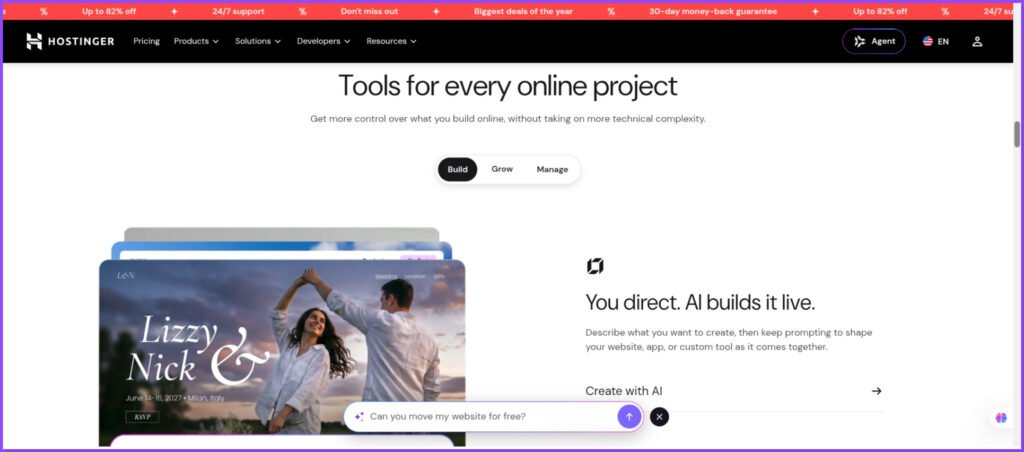
Its hosting products include:
- Shared web hosting
- Managed WordPress hosting
- Cloud hosting
- VPS hosting
- Website builder
- Domain registration
- Business email solutions
One of the main things that differentiates Hostinger’s approach is its custom hosting management interface, called hPanel. Instead of relying on the traditional cPanel interface, Hostinger provides its own dashboard for managing websites, domains, databases, email accounts, backups, and other hosting-related settings.
This can make website management easier for people who are not familiar with traditional server administration.
For developers and experienced website owners, Hostinger also provides access to various technical tools depending on the selected plan.
My Experience With Hostinger After 2+ Years
I have used Hostinger for more than two years and have worked with multiple hosting plans during this period.
As someone involved in web development, website design, and SEO, I look at hosting from a slightly different perspective than someone purchasing it for a personal blog.
A hosting service should not only make it possible to publish a website. It should also provide a manageable environment for installing applications, updating websites, handling databases, managing domains, and maintaining a stable online presence.
During my experience with Hostinger, I have become familiar with its hosting environment and website management workflow.
Here are some of the areas I consider important when evaluating the platform:
- Ease of website management: A hosting dashboard should make everyday tasks understandable without requiring advanced server knowledge.
- WordPress management: Installing, updating, and maintaining WordPress should be straightforward.
- Resource availability: Storage, memory, processing power, and other account limits should match the requirements of the website.
- Backup and recovery: Website owners should understand how backups work and how to restore their websites when something goes wrong.
- Long-term affordability: The introductory price is only one part of the total hosting cost. Renewal pricing also matters.
- My overall approach is to evaluate hosting based on its practical usefulness rather than the number of features advertised on its pricing page.
Editorial note: This review covers my experience with multiple Hostinger plans, but individual performance measurements and plan-specific observations should be considered separately. Hosting performance can vary based on the website, server location, configuration, and traffic.
Hostinger Hosting Plans Explained
Hostinger offers different hosting options for different website requirements. Choosing the correct plan is important because a beginner’s blog and a growing e-commerce website do not have the same hosting requirements.
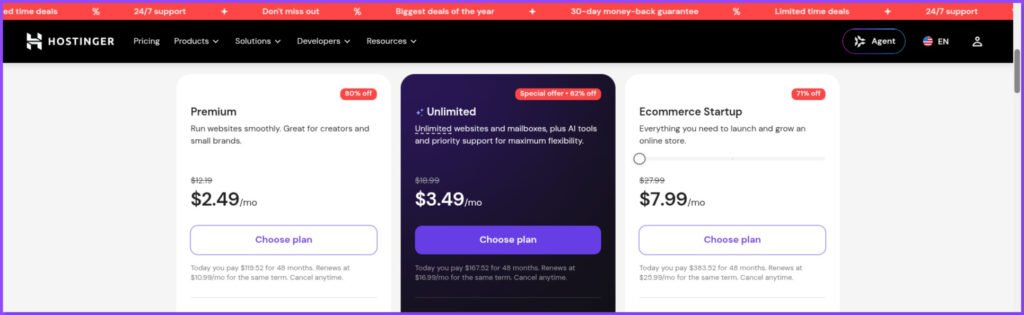
Here is a general explanation of its main hosting categories.
1. Shared Web Hosting
Shared hosting is designed for people who want to host websites without managing an entire server themselves.
Multiple customer accounts share the underlying server infrastructure, with allocated resources and account-level limits.
It can be suitable for:
- Personal blogs
- Portfolio websites
- Small business websites
- Informational websites
- New WordPress projects
The main advantage is accessibility. You do not need to manage server infrastructure independently.
However, shared hosting has resource limitations. Websites with heavy traffic, complex applications, or resource-intensive operations may eventually require a more powerful hosting environment.
2. Managed WordPress Hosting
WordPress hosting is designed to make running WordPress websites easier.
Hostinger provides WordPress-related management features, including installation and website management tools.
This option can be useful for:
- Bloggers
- Content publishers
- Small business owners
- WordPress developers
- Affiliate marketing websites
Before choosing a plan, check its available storage, backups, PHP resources, database limits, and WordPress-related features.
Also remember that managed WordPress hosting does not mean every technical task is automatically handled for you. Plugin updates, theme compatibility, website optimization, and content security still require attention.
3. Cloud Hosting
Cloud hosting is intended for websites that require more resources than entry-level shared hosting can comfortably provide.
Depending on the selected plan, Hostinger offers additional CPU, RAM, storage, and other resources.
It may be worth considering for:
- Growing business websites
- Established content websites
- Larger WordPress projects
- Online stores
- Agencies managing multiple websites
Cloud hosting generally costs more than entry-level shared hosting. Therefore, upgrading only makes sense when your website actually needs additional resources.
4. VPS Hosting
Virtual Private Server hosting provides a more configurable hosting environment.
Unlike standard shared hosting, VPS users receive dedicated virtualized server resources and greater control over their server environment.
VPS hosting may be suitable for:
- Developers
- Custom applications
- Resource-intensive websites
- Applications requiring specific server configurations
- Projects requiring greater administrative control
However, VPS hosting requires more technical knowledge. You may need to manage server software, security configurations, updates, and other administrative responsibilities.
For beginners who only want to launch a WordPress website, VPS hosting may introduce unnecessary complexity.
Hostinger hPanel: Is It Easy to Use?
One of the features worth discussing separately is Hostinger’s hPanel. The hosting control panel is where website owners perform most of their everyday hosting-related tasks.
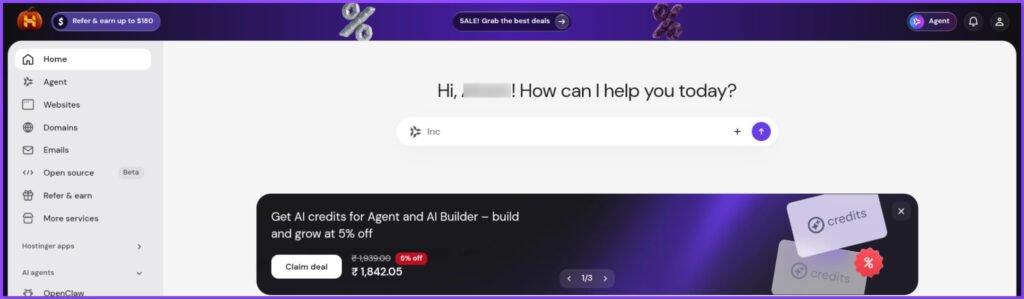
Instead of using cPanel, Hostinger provides its own interface with tools for website management.
Some of the common tasks you can manage through hPanel include:
- Adding and managing websites
- Managing domains and DNS settings
- Creating databases
- Accessing File Manager
- Managing FTP and SFTP access
- Configuring SSL
- Managing backups
- Accessing WordPress tools
- Reviewing hosting resource usage
For beginners, having these tools available in one dashboard can reduce the learning curve.
For developers, the availability of file access, database management, PHP settings, and other technical options is useful.
However, hPanel is not a replacement for understanding how websites work.
For example, if your WordPress website experiences a database connection error, you still need to understand the relationship between WordPress configuration files, database credentials, and the hosting environment.
My recommendation: Spend some time exploring hPanel after purchasing a hosting plan. Understanding where important tools are located can save time when troubleshooting website issues.
WordPress Hosting Experience
WordPress is one of the most widely used platforms for building websites, and hosting compatibility is an important consideration when selecting a provider.
Hostinger supports WordPress installation and management through its hosting platform.
This makes it possible to set up a WordPress website without manually configuring every component of the installation.
For a typical WordPress project, the process involves:
- Selecting a hosting plan.
- Connecting a domain name.
- Installing WordPress.
- Configuring the SSL certificate.
- Selecting a theme.
- Installing the required plugins.
- Publishing website content.
For people building their first website, this process can be considerably easier than manually setting up a web server.
However, WordPress performance does not depend on hosting alone.
Your website’s performance also depends on:
- Theme quality
- Number of installed plugins
- Image sizes
- Caching configuration
- Database optimization
- External scripts
- CDN configuration
- Server resources
A poorly optimized WordPress website can perform badly even on a reasonably powerful hosting plan.
Likewise, a lightweight and properly optimized website can perform well on an entry-level hosting plan.
This is why I would not recommend upgrading hosting simply because a website has a low PageSpeed score. First, identify the actual performance bottleneck.
Hostinger Website Performance: What Should You Expect?
Website speed is one of the most important factors when evaluating a hosting provider.
A slow website can affect user experience, conversions, and search performance.
However, it is important to understand that a hosting provider alone does not determine website speed.
For example, a WordPress website with large uncompressed images, unnecessary JavaScript, multiple third-party scripts, and poorly configured plugins may load slowly even when the server is performing normally.
When evaluating Hostinger performance, I recommend testing the following:
Server Response Time
Time to First Byte (TTFB) measures how long it takes for a browser to receive the first byte of a response from the server.
A consistently high TTFB may indicate server-side delays, although network conditions and application configuration can also contribute.
Largest Contentful Paint
LCP measures how long it takes for the largest visible content element to render.
For a good user experience, Google recommends an LCP of 2.5 seconds or less.
Interaction to Next Paint
INP measures how quickly a page responds to user interactions.
Google recommends an INP of 200 milliseconds or less for a good user experience.
Cumulative Layout Shift
CLS measures unexpected layout movement during page loading.
A good CLS score is 0.1 or less.
How to Test Your Hostinger Website
You can use these tools:
- Google PageSpeed Insights: https://pagespeed.web.dev/
- GTmetrix: https://gtmetrix.com/
- Chrome DevTools: https://developer.chrome.com/docs/devtools/
I recommend testing both mobile and desktop versions.
Also, run multiple tests under reasonably consistent conditions instead of depending on a single result.
For a more meaningful hosting assessment, document the website’s hosting plan, server location, WordPress setup, caching configuration, and testing location.
Important: A PageSpeed score is not a direct hosting performance score. It evaluates the overall page experience, including factors that hosting providers cannot independently control.
Security and Website Backup Features
Website security is another important part of hosting.
A website may contain customer information, business content, login credentials, contact forms, and other important data.
Hostinger provides various security-related features depending on the hosting product and plan.
These may include:
- SSL certificates
- Website backup tools
- Malware scanning
- Account access controls
- Secure file transfer options
- Other hosting security protections
SSL Certificates
An SSL certificate enables HTTPS connections between a website and its visitors.
HTTPS helps protect information transferred between the browser and website.
SSL is particularly important for business websites, login pages, and e-commerce websites.
However, having an SSL certificate does not automatically make a website completely secure.
You should still use strong passwords, keep WordPress updated, install trusted plugins, and follow good security practices.
Website Backups
Backups are essential because websites can experience problems due to:
- Accidental file deletion
- Failed plugin updates
- Malware infections
- Database errors
- Incorrect website configurations
- Failed migrations
Hostinger provides different backup schedules depending on the hosting plan.
Before purchasing, check whether your chosen plan includes weekly or daily backups and whether on-demand backups are available.
Also, understand the restoration process.
My recommendation is to maintain an independent backup of important websites rather than depending entirely on your hosting provider’s backup system.
For business-critical websites, consider storing backups in a separate location.
Hostinger Customer Support
Customer support becomes important when something goes wrong with your website.
Even experienced developers occasionally need help with hosting-related issues.
Before evaluating a hosting provider’s support, consider the types of problems you may encounter:
- Domain connection issues
- DNS configuration problems
- SSL certificate errors
- WordPress installation problems
- Database connection errors
- Website migration questions
- Email configuration issues
- Hosting resource limitations
Hostinger advertises 24/7 customer support through its support channels.
However, availability of support and the quality of a particular support interaction are two different things.
When evaluating customer support, look at:
- How quickly an agent responds.
- Whether the agent understands the issue.
- Whether the explanation is technically accurate.
- Whether the problem is resolved.
- Whether the support team provides useful troubleshooting steps.
I recommend documenting actual support interactions rather than making broad claims about response times or resolution quality.
A useful review should also distinguish between problems caused by the hosting environment and problems caused by website configuration.
Hostinger Pricing: Is It Really Affordable?
Pricing is one of the reasons many people consider Hostinger.
Its promotional prices can make it accessible to beginners, freelancers, and small businesses.
However, there is one important detail that every buyer should understand:
The introductory price and renewal price are not necessarily the same.
Hosting providers commonly offer discounted prices for longer initial subscription periods.
When the initial term expires, the service renews at the applicable renewal rate.
This means that a plan advertised at a low monthly equivalent may require a substantial upfront payment for a multi-year subscription.
What to Check Before Purchasing
| Pricing factor | Why it matters |
|---|---|
| Introductory price | Determines your initial cost |
| Subscription duration | Affects the total upfront payment |
| Renewal price | Determines future hosting expenses |
| Free domain | Check its validity period |
| Email accounts | Check included mailbox limits and duration |
| Backups | Confirm frequency and availability |
| Storage | Ensure sufficient space for your website |
| Resource limits | Understand CPU, RAM and PHP limits |
For example, if a hosting plan advertises a monthly equivalent based on a 48-month subscription, you should not assume that you can purchase only one month at that advertised rate.
Always check the complete checkout amount.
Also, check the applicable renewal price before completing your purchase.
Hostinger’s official pricing page provides the current plan comparison: https://www.hostinger.com/in/pricing
My advice: Do not choose a hosting provider based only on the biggest discount percentage. Compare the total initial payment, renewal cost, included features, and expected website requirements.
A slightly more expensive plan may be more suitable if it offers the resources your website actually needs.
Hostinger Pros and Cons
No hosting provider is perfect for every type of website.
Based on my experience with Hostinger and the practical requirements of website owners, here are the main advantages and limitations to consider.
Pros
1. Beginner-friendly management
The hPanel interface provides a centralized environment for managing common hosting tasks.
2. WordPress support
Hostinger offers WordPress installation and management tools that help simplify website setup.
3. Multiple hosting options
Users can choose between shared hosting, cloud hosting, and VPS hosting depending on their requirements.
4. Integrated website management
Domain management, databases, files, backups, and other hosting tools are available through the hosting environment.
5. Accessible entry-level pricing
Its promotional pricing can make it an option for people starting their first website, provided they understand the subscription terms and renewal costs.
6. Useful for common website projects
Small business websites, portfolios, blogs, and many standard WordPress projects can operate within the capabilities of an appropriately selected plan.
Cons
1. Renewal costs need attention
The introductory price may be significantly different from the renewal price. Buyers should calculate the long-term cost before purchasing.
2. Hosting resources are limited by the plan
Shared hosting is not designed to provide unlimited computing resources. CPU, RAM, storage, PHP workers, and other limits matter.
3. Performance depends on website optimization
A hosting subscription cannot compensate for an unnecessarily heavy theme, excessive plugins, or poorly optimized images.
4. Plan features are not identical
Backup frequency, storage, resources, and other features differ between hosting products and subscription tiers.
5. Advanced projects may need more control
Developers running specialized applications or requiring custom server configurations may find VPS hosting or another infrastructure solution more appropriate.
6. Long-term subscriptions require planning
A low advertised monthly equivalent may require a large upfront payment for a longer subscription period.
Is Hostinger Good for Different Types of Websites?
The right hosting plan depends on what you want to build.
Here is how I would approach the decision.
| Website type | What to consider |
|---|---|
| Personal blog | Entry-level shared hosting may be sufficient |
| Portfolio website | Shared hosting is worth considering |
| Small business website | Check storage, resources and email requirements |
| WordPress website | Evaluate WordPress support and resource limits |
| Affiliate website | Consider traffic growth, backups and performance |
| WooCommerce store | Review database, PHP, backup and resource requirements carefully |
| Large content website | Consider higher-resource hosting options |
| Custom web application | Evaluate VPS or specialized hosting |
Is Hostinger Good for Beginners?
Hostinger can be a practical starting point for beginners who want to launch a website without managing a server independently.
Its hosting dashboard and WordPress tools help reduce the technical complexity of getting started.
However, beginners should understand the difference between introductory pricing and renewal pricing before purchasing.
Is Hostinger Good for Freelancers?
Freelancers building websites for clients may find Hostinger useful for common website projects.
However, the appropriate plan depends on the number of websites, available resources, client requirements, and backup needs.
If you manage multiple client websites, consider whether a shared hosting account provides sufficient isolation, access management, and resources for your workflow.
Is Hostinger Good for E-commerce?
Hostinger can be considered for smaller e-commerce projects, but choosing a plan requires more care.
An online store may need additional resources because of product databases, customer sessions, payment integrations, search functionality, and traffic spikes.
Before selecting a plan, evaluate its available resources and test the actual store configuration.
For larger or business-critical stores, compare higher-resource hosting solutions as well.
Hostinger vs Other Hosting Providers
Hostinger is not the only option available.
Depending on your budget, technical experience, and website requirements, you may also want to compare:
- Bluehost
- SiteGround
- Cloudways
- A suitable VPS provider
These services do not offer identical hosting environments, pricing models, or management experiences.
For example, a beginner looking for simple shared hosting may prioritize ease of use and upfront affordability.
An experienced developer may place more importance on server-level control, resource allocation, staging, and infrastructure flexibility.
An established online store may prioritize scalability, backups, support, and reliability.
Rather than declaring one provider the winner for everyone, compare the following:
- Total cost over the first and subsequent subscription periods.
- Server resources and technical limitations.
- Backup and restoration policies.
- Data centre locations.
- Support channels and availability.
- Migration options.
- Server configuration flexibility.
The right choice is the one that matches your actual project requirements.
Important Things to Know Before Buying Hostinger
Before purchasing any hosting plan, I recommend following this checklist.
1. Understand the renewal price
Do not evaluate a hosting plan using only its promotional price.
2. Choose the correct subscription duration
Longer subscriptions may offer lower monthly equivalents, but they require a larger upfront payment.
3. Check the hosting resources
Look beyond storage. CPU, RAM, PHP workers, database limits, and inode limits can affect your website.
4. Check backup frequency
Understand how frequently your website is backed up and how restoration works.
5. Choose an appropriate server location
Consider the geographical location of your primary audience when selecting an available data centre.
6. Optimize your website
Use a lightweight theme, compress images, remove unnecessary plugins, and configure caching properly.
7. Maintain independent backups
Keep copies of important website files and databases outside your hosting account.
8. Understand the refund policy
Review the current money-back guarantee, eligibility conditions, exclusions, and applicable time limits before purchasing.
Final Verdict: Is Hostinger Worth It in 2026?
After more than two years of using Hostinger and working with multiple hosting plans, I consider it a hosting provider worth evaluating for common website projects.
Its combination of website management tools, WordPress support, and multiple hosting options makes it relevant to beginners, freelancers, bloggers, and small businesses.
However, I would not recommend choosing it simply because of a promotional discount.
Your hosting decision should depend on your website’s actual requirements.
If you are starting a blog, portfolio, or small business website, an appropriately configured shared hosting plan may be sufficient.
If you are running a growing WordPress website or online store, examine the available resources and consider whether a higher-tier plan is justified.
If you need advanced server control or specialized infrastructure, compare VPS and other hosting solutions.
My recommendation: Consider Hostinger if its current plan specifications, management tools, support arrangements, and total subscription cost match your requirements. Take time to compare alternatives before making a long-term commitment.
The best hosting provider is not necessarily the cheapest one. It is the one that offers the right balance of performance, resources, support, usability, and cost for your particular website.
If you are planning to launch a website, understand your requirements first and then choose your hosting accordingly.
Explore Hostinger’s official plans: https://www.hostinger.com/in/pricing
Frequently Asked Questions About Hostinger
Is Hostinger good for beginners?
Hostinger can be suitable for beginners because it provides a centralized hosting dashboard, WordPress installation tools, and website management features. However, beginners should understand subscription terms, renewal costs, and hosting resource limits before purchasing.
Is Hostinger good for WordPress websites?
Hostinger offers WordPress-compatible hosting and management tools. It can be considered for blogs, portfolios, business websites, and other WordPress projects. Actual performance depends on the hosting plan, website configuration, plugins, theme, and traffic.
Is Hostinger cheap in India?
Hostinger offers promotional pricing in India, but the actual cost depends on the selected plan and subscription duration. Always compare the total upfront payment with the applicable renewal price.
Does Hostinger provide free SSL?
Hostinger includes free SSL certificates with its eligible hosting plans. Check the current plan details and SSL coverage before purchasing.
Does Hostinger offer daily backups?
Backup frequency depends on the hosting plan. Some plans include weekly backups, while others offer daily and additional backup options. Check the current plan comparison before subscribing.
Can I host multiple websites on Hostinger?
Yes, certain Hostinger plans support multiple websites. The number of websites and available resources depend on the selected plan. Check the website limit and associated resource allocation before purchasing.
Is Hostinger suitable for e-commerce websites?
Hostinger can be considered for smaller e-commerce websites, depending on the plan and store requirements. Larger stores should carefully evaluate resource allocation, backups, database capacity, and scalability.
Can I upgrade my Hostinger hosting plan later?
Hostinger offers plan upgrade options for eligible hosting products. The available upgrade paths and associated charges depend on your current subscription and hosting product.
Is Hostinger better than Bluehost?
Neither provider is automatically better for every website. Compare their current pricing, resources, support, management interfaces, and renewal terms based on your project requirements.
Is Hostinger worth it for long-term website hosting?
It can be worth considering for long-term projects if the hosting resources, support, performance, and renewal costs remain suitable for your needs. Review the full subscription cost rather than relying only on the initial discount.
